Recruiting software for healthcare
Fill physician and provider roles yourself, without paying agency premiums.
Quickly find and vet candidates. Easily post jobs ready for Google’s job search. Look up the going rate in seconds.
Ask about a 15-day pilot at your hospital. No subscription needed to try it.
Recruiting at most hospitals today, and with our recruiting software
Six things that keep hospitals paying others a premium to fill provider roles. Pick one to see how it changes.
An agency fills the seat, and bills for every hour.
See which seats to hire for, then recruit them yourself.

- Every locum and float pool shift on one calendar: confirmed, tentative, canceled, available or orientation
- Days that still need coverage stand out, and only confirmed shifts count toward spend
- What hiring a standing seat permanently would save each year
A CV comes in. It sits in someone’s inbox.
Every candidate on the position, in order.

- Applicants from your careers page land on the right position
- Everyone sees the same board, from Lead to Started
Coverage costs show up as invoices, after the fact.
What coverage costs, every month, before the invoice.

- Staff on payroll, float pool and agency locum spend side by side, month by month
- Each department’s seats and what its coverage costs
A problem in a provider’s past turns up two weeks before the start date.
Public records checked before you invest in an interview.

- Board actions, exclusions, court records and news, each with its source
- A credentialer confirms each finding before it counts
Your jobs are buried on the hospital’s website, where candidates can’t find them.
Home › About us › Human Resources › Employment › Opportunities
Employment opportunities
Physician openings (PDF, updated March 2023)
To apply, create an account and fill out the 12-page online application. Then upload your CV.
Now your jobs are ready for Google’s job search.

- Every job is marked up for Google’s job search, on your own careers page
- Candidates apply in minutes with their CV; our CV reader fills in the details for your recruiters, so applying is quick
- Jobs come off by themselves when the position is filled
What each recruiter knows lives in their own notes.
One shared history for every provider.

- Every recruiter’s notes on one provider, in one place
- A one-click summary of the whole history
Your own recruiting team, fully equipped
What you pay agencies for today, and how your team does the same work in our recruiting software.
| Agencies | Your team, with our recruiting software |
|---|---|
| Find candidates | Search the national NPI registry and your own provider database, and look up contact details. |
| Advertise the job | Your careers page, marked up for Google’s job search, plus ready-to-paste posts for job sites. |
| Screen and vet | Public-record checks, resume/CV reading and NPI checks for your applicants. |
| Know the going rate | Estimated salary and bill-rate ranges for a specialty and region, with sources, saved to your own market rate library as your team searches. |
| Run the pipeline | Candidate boards, offers, credentialing and onboarding on every position. |
| A premium on every hire and every hour | No placement fees or hourly markups. You pay a subscription for the software instead. |
We know agencies and locums may still be part of your solution.
When they are, Lulu, our AI, helps you negotiate more favorable terms. Upload an agency contract and she pulls out the rates, fees and conversion terms, flags what to push back on and drafts redlines to send back — a head start for your counsel, not legal advice.
Our recruiting software also tracks those providers and what they cost, and shows you which seats are worth filling permanently.
“Clean” candidates who aren’t.
How many times has an agency sent a candidate who looked clean, only for credentialing to turn up a red flag weeks later? Our provider check looks for what’s in public records on the front end: state medical board actions, OIG and SAM exclusions, court records and news, each with its source, before you invest in an interview.
It covers public information only and can miss records, so it’s still best practice to run an NPDB report, and your full credentialing process still applies. A credentialer confirms each finding before it counts.
Watch it work
Under a minute each, from four seats at the same sample hospital. Turn your sound on for the narration, or follow the captions.
Read what the video says
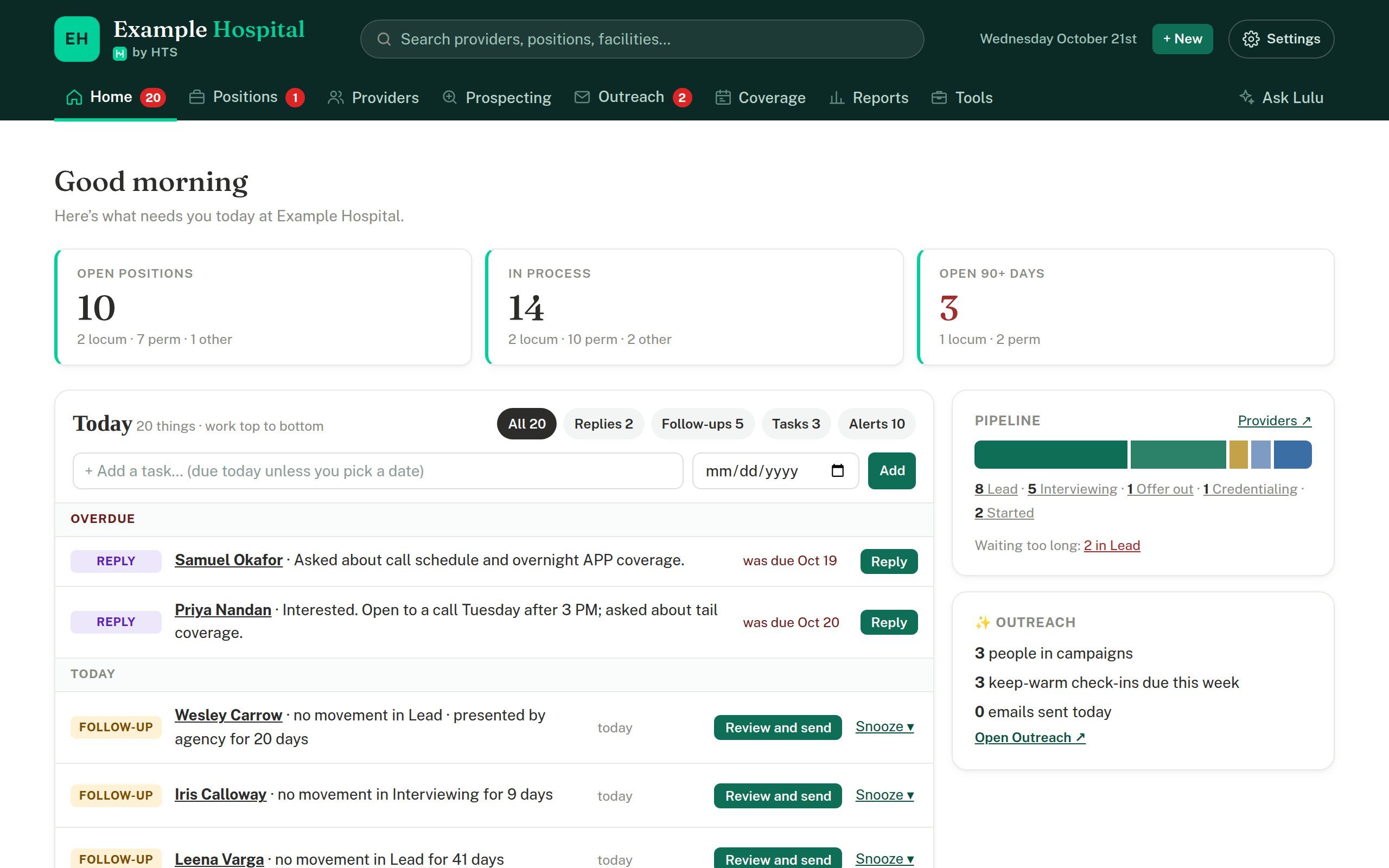
Home is your Today list: replies, follow-ups and next steps, with anything overdue first. Add a provider in five fields. Lulu picks the best position for them. Each position they're on has its own stage. Interviewing asks when, how and with whom. The interview becomes their next step, so nothing gets missed. Next, the offer: enter the terms, and send them to the department head to approve if you like. Over your fair-market-value limit? The offer can't go out until someone signs off, and the app records who signed and why.
Read what the video says
Department heads get their own Home: their searches, and what is waiting on them. Approve an offer's terms in one click, recorded under their own name. Interviews in the next 7 days, each with a calendar invite. Need a new physician? Open the position, or send it for approval if your hospital requires that.
Read what the video says
Reports answer the questions leaders ask: are we filling our jobs, and what is coverage costing? Total cost of coverage: staff on payroll, hires, float pool, agency locums and placement fees, month by month. Cost by department: pick a location, and see each department's seats, empty seats and open requisitions. Short a seat? Request a position, already filled in. Or convert a locum to an employee. Locums-to-perm: where agency coverage has become a standing seat, and what hiring would save.
Read what the video says
Settings are grouped so a System Admin finds things fast. Staff on payroll: each department's providers, allotted seats and pay, as an average or each salary. Who sees what: tick what each role can see, for the whole hospital or one department. Preview exactly what someone in that role will see. Hidden means blocked by the database, not just hidden on screen. And turn off the parts of the app your hospital doesn't use.
Meet Lulu. She does the routine work. Your team builds the relationships.
With Lulu, the slow parts of recruiting — checking public records, catching up on a provider’s history, reading contracts, finding people to call — go much faster. Every result shows where it came from, and a person decides what to do with it.
Watch Lulu work
Under a minute each, at the same sample hospital. Turn your sound on for the narration, or follow the captions.
Read what the video says
Lulu helps you find people. Search the national NPI registry by specialty and state. One click adds a doctor, and Lulu vets them: phone, email, LinkedIn and a public-record check. Public records come back with a source for every finding, so you catch red flags before the interview. When the CV arrives, Lulu fills in the record and flags any gap in work history of a month or more.
Read what the video says
Every recruiter's notes on a provider live in one place. Summarize with Lulu, and anyone can pick up the relationship where it left off. Lulu knows the going rate for the role you're filling. And she writes job posts that sell the role and the town. Ask Lulu about your own searches. She answers from what you're allowed to see, with links to each record.
Read what the video says
Upload an agency contract, and Lulu pulls out the rates, fees and conversion terms. She flags what to push back on, and why. Then she drafts the redlines to send back, as a head start for your counsel. When the agency sends it back, Lulu tells you what they changed and how to answer. Lulu suggests. Your team decides.
Read what the video says
Pick an open position, and Lulu suggests the providers who fit. You choose how much you check before emails go out, and first emails go out on weekday mornings in each provider's time zone; Lulu's answers to replies go out within minutes. Lulu writes each one a personal email. Approve the first few, and she sends the rest. Each campaign shows who replied, with whoever is waiting on you first. Tell Lulu what matters for this role: instructions, guardrails, and how many questions she answers before handing off. Add more people from your Providers tab, filtered by specialty, license and stage.
- Lulu vets candidates
- Lulu searches public records for state medical board actions, OIG and SAM exclusions, court records and news, with each source and how likely it is to be the same person. Reminders for monthly exclusion checks show on Home. She reads a resume/CV into a provider record and flags any work gap of a month or more.
- Lulu finds people to call
- Search the national NPI registry by specialty, state or distance from a ZIP code, add providers in one click, and look up professional phone, email and LinkedIn with links to check them. Lulu sums up everything every recruiter has written about a provider, so anyone can pick up where it left off.
- Lulu writes, prices and negotiates
- Lulu writes job posts that sell, with a sourced “about the area” section from your practice details. She looks up the going salary or locum bill rate for a specialty and region, with sources. She reads agency and provider contracts, flags what to push back on and drafts redlines, so you can negotiate more favorable terms: a head start for your counsel, not legal advice.
- Ask Lulu
- Ask Lulu how your searches are going, who’s interviewing this week or what needs you today. She answers from what you’re allowed to see, with links to each record, and can’t change anything. Ask her staffing questions too (licensing, pay ranges, how to structure an offer) and she searches the web for current answers.
Lulu is AI: she suggests, your team decides. Your System Admin can turn any of Lulu’s features off and set how many AI actions each person can use in a month.
Add-on
Outreach: Lulu emails providers the way an expert recruiter would
One recruiter can keep in touch with far more providers.
- Campaigns for a new position. Pick providers who fit and Lulu writes a personal email to each, with follow-ups if they don’t answer. Choose how much you check first: every email, the first few, or let Lulu send them. And choose whether Lulu answers routine questions on her own.
- Campaigns without a position. Introduce your hospital or a new service and build interest. Lulu sticks to the talking points you give her.
- Everything about a campaign in one place. See who replied, who’s waiting on you, and replies sorted by type: interested, questions, not now. Add more people from your Providers list using filters. Interested providers are added as leads on the position automatically.
- Lulu’s settings for each role. Tell Lulu what matters for this role, set guardrails she must follow, and choose how many routine questions she answers before handing someone to you.
- Replies sorted for you. Interested, questions, not now. A reply is ready for you to review on Home.
- Keep warm. For “not now” providers, note why and when. Lulu drafts a check-in every 3, 6 or 12 months, or around a date they gave, like a contract ending. Change or remove anyone any time.
- Careful sending, built in. Every email carries your hospital’s mailing address and an unsubscribe link. Bounces and opt-outs stop future emails on their own. First emails go out on weekday mornings in each provider’s time zone, Lulu’s answers to replies go out within minutes, and a new hospital’s first weeks start small.
- You stay in control. Take over any conversation, stop emails to anyone, and read every email that went out. A campaign ends when its position is filled, on its end date, or when you end it.

One place for everyone who helps fill a position
Each person sees what they need: recruiters work candidates, finance sees cost, directors see their department, and credentialing sees what’s outstanding.
Recruiters
Start each day with one list, and keep track of every provider
- Home shows everything due today in one list: replies, follow-ups, tasks and next steps, with anything overdue first.
- Every provider shows their status and next step, and each position they’re considered for has its own stage, so it’s clear what happens next.
- A Quick screen guides a first call, and Lulu turns a call or interview transcript into a short summary note.
- Moving someone to Interviewing asks when, how and with whom; Offer out opens the offer and sets the follow-up.
- Add a provider in five fields, or read a resume/CV into a record in seconds. Lulu picks the best position.
- Publish jobs to your own careers page and get an email when someone applies.
- Send the offer letter for e-signature: the provider signs from their phone and moves to Accepted.

Finance
See what coverage really costs
- Total cost of coverage each month: staff on payroll, hires, float pool, agency locums and placement fees.
- Cost by department: each department’s full cost and its seats (allotted, on staff, empty seats and open requisitions), with the locums worth converting.
- Locum and agency spend by department, with the premium you pay over employed rates.
- Locums-to-perm: departments where agency coverage has become a standing seat, with the savings from hiring.
- Cost per hire and time to fill for every position.
- What recruiting in-house has saved: agency fees avoided, locums converted to employees and float pool coverage.

Department heads and medical staff leaders
Their own Home: how are my searches going?
- Their department’s searches, with where each one stands and what happens next.
- Offer terms and new position requests waiting on them, approved in one click under their own name.
- Interviews in the next 7 days, each with a calendar invite.
- Their department’s seats: allotted, on staff and open requisitions, with Request a position when they’re short.
- Locum coverage and spend for their department, when you let them see it.


System Admins
Decide who sees what
- Tick what each role can see: agency bill rates, locum spend, cost reports, staff on payroll totals, offer pay, market rates, contact and personal details, CVs.
- Enter staff on payroll by department, for any kind of provider: full-time and part-time employees, allotted seats, and an average or each salary. Only you change it; individual salaries stay with System Admins and accounting.
- Agency bill rates and locum spend start visible to everyone, so the whole team can see what agencies cost and look for savings.
- Set it once for the hospital, then change it for any department that works differently.
- Preview exactly what a role will see before you save.
- Hidden means blocked by the database, not just hidden on screen. Every change is logged.
- Offers above your fair-market-value limit need a recorded sign-off (a name and a reason) before they go out.

Credentialing
Know what’s outstanding before the start date
- A credentialing checklist for each provider and each facility, with expiration dates that turn red on their own.
- Background check summaries with sources, for a credentialer to review.
- The file locks once a provider is hired, and only a System Admin can unlock it.
- Status and dates only: credentialing documents stay in your own systems.

Your jobs on your own careers page, ready for Google search
Every hospital gets a careers page that lists its open positions. Each job is marked up so it can appear in Google’s job search, and it comes down on its own when the position is filled.
- Candidates apply with a short form and can attach a resume/CV.
- Applicants land on the position in your recruiting software, and the recruiter gets an email.
- Applications pass spam checks before they reach you.
Getting started
A setup checklist in the app walks your System Admin through it.
- Add your facilities and departmentsWhere your positions are and who they report to.
- Invite your teamRecruiters, department heads, finance and credentialing, then check who sees what.
- Open a positionAdd the practice details candidates look for, then publish it to your careers page.
- Track it to the start dateCandidates, offers, credentialing and onboarding in one place.
Built to keep your hospital’s data to itself
Our recruiting software holds recruiting records, not patient records. Read how we protect your data.
- Two-step sign-in
- Required for System Admins; each hospital can require it for everyone.
- A record of who did what
- An activity log shows who viewed or changed provider records.
- You decide who sees what
- Rates, spend and personal details are shown only to the roles you choose, and the database enforces it.
- Encrypted, with no trackers
- Everything travels over HTTPS and is encrypted at rest. The app loads no ads, trackers or third-party analytics.
Pricing
One monthly fee for your hospital, with AI actions included each month. Add more AI actions when you need them, and turn any AI feature off.
See it with your own open positions
Tell us a little about your hospital and we’ll be in touch.